
What Is Clyro? The AI Store Platform, Explained (2026)
Clyro team · Nov 7, 2026 · 12 min read
Clyro is an AI store platform. You describe your shop in a sentence, and Clyro builds the store: the design, the pages, sample products and the basics like shipping. Then it stays with you to run it, with orders, payments, marketing, analytics and an AI Store Manager that changes anything you ask. This guide shows what Clyro is, how it works and what every part of the dashboard does, with screenshots.
Clyro in one minute
- One platform: build the store, take payments, sell and run it, all in one place.
- The Store Manager: an AI that builds, changes and explains your store in plain words.
- A visual builder for everything you would rather do by hand.
- Everything to run a shop: products, inventory, orders, payments, markets, discounts, flows and analytics.
- Your payment provider: pick any you like; Clyro takes a small fee per sale that drops as you grow.
- Three plans: Starter, Growth and Scale, from $29 a month, each with a free trial.
What is Clyro?
Clyro is where you build an online store and run it. Most store builders hand you a template and a long list of settings. Clyro starts from what you tell it: what you sell, who it is for and how it should feel. Its Store Manager turns that into a working store, with real pages and products you can edit, and keeps working with you after launch.
Everything a shop needs sits behind one sidebar: the storefront and its designs, products and inventory, orders and customers, content, discounts, analytics, markets and flows. The Store Manager is on every page of it, so you can ask for a change wherever you are, or make it yourself.
How Clyro works
Here is where each part of running a store happens in Clyro, and below, a closer look at each with a screenshot.
| What you want to do | Where it happens in Clyro |
|---|---|
| Start a store | Home: describe it, paste a product link or show a store you like |
| Change the design | Ask the Store Manager, or edit it in the visual builder |
| Add and manage products | Products, collections, categories and inventory |
| Take payments | Your provider; cards, Apple Pay, Google Pay, PayPal, bank transfer and cash on delivery |
| Sell in other countries | Markets, with currencies, prices, languages and AI translation |
| Try a new look safely | A/B tests |
| Automate the routine | Flows |
| See how it is going | Analytics, reports, attribution and Live View |
| Work from your own AI | MCP, for Claude, ChatGPT and Cursor |
1. Start with a sentence, a link or a store you like
Home is where every store begins. Tell the Store Manager what you sell and how it should look, paste one product link and let Clyro build a store around it, or point at a store whose style you like. Once the store exists, Home keeps the numbers that matter at the top and a checklist that walks you to your first sale.
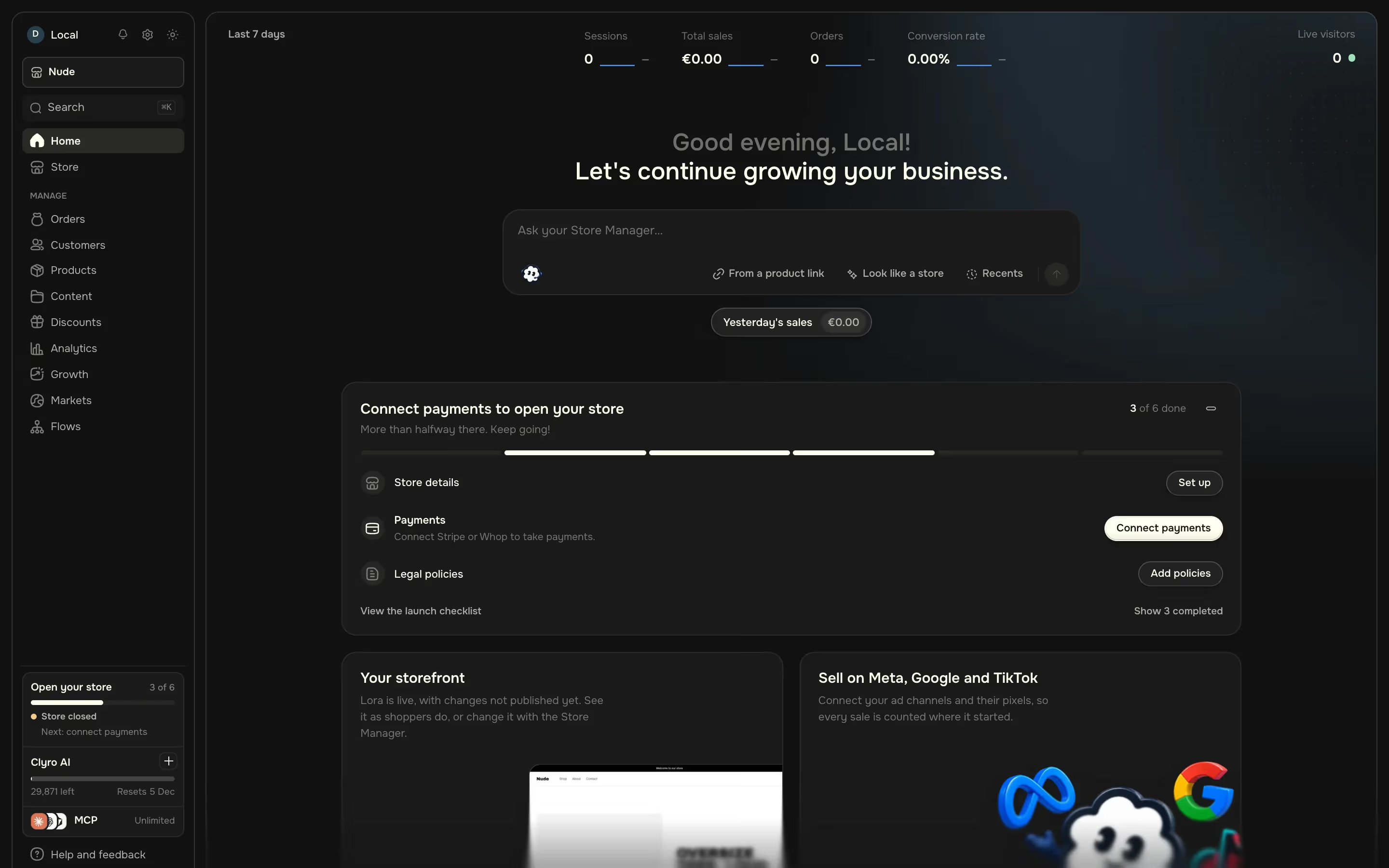
- 1Ask the Store Manager to build, change or explain anything
- 2Or start from a product link, or a store whose style you like
- 3Sessions, sales, orders and conversion at a glance
- 4A checklist that walks you to your first sale
- 5Orders, customers, products, content, analytics, markets and flows
- 6Your AI credits for the month
2. The Store Manager builds it, then changes it
The Store Manager is Clyro’s AI. Ask it for a store and it plans the work, builds the pages, writes the copy, adds products and sets up the basics, then tells you what it did and what is still for you to do. After that, you keep talking to it: “make the header darker”, “add a size guide to every product”, “why are my sales down this week?”. It builds, changes and explains, and your store updates beside the chat as it works.
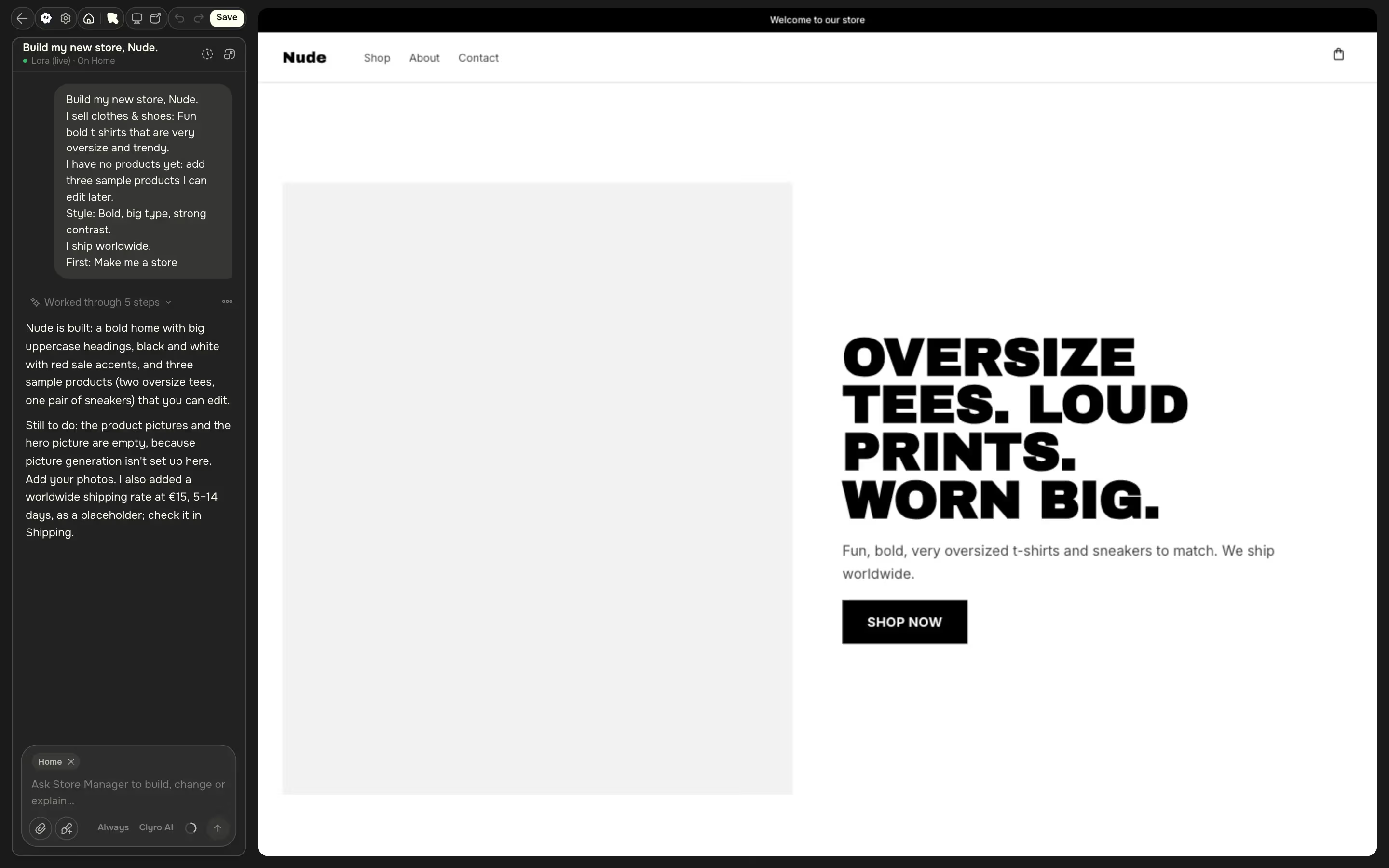
- 1What you asked for, in your own words
- 2Every step it took, ready to open
- 3What it changed, and what is left for you
- 4Ask for the next change; it knows which page you are on
- 5Your real store, updating as it changes
- 6Preview on phone, tablet and laptop; undo, redo and save
3. Change anything by hand in the visual builder
Some changes are quicker to make than to describe. Click anything on the page to select it, then move it, duplicate it, delete it or change its settings. Text edits right where it sits. Sections and blocks, colours, fonts, buttons and layout are all yours to change, and you can bring your own fonts. Every save is a version you can go back to.
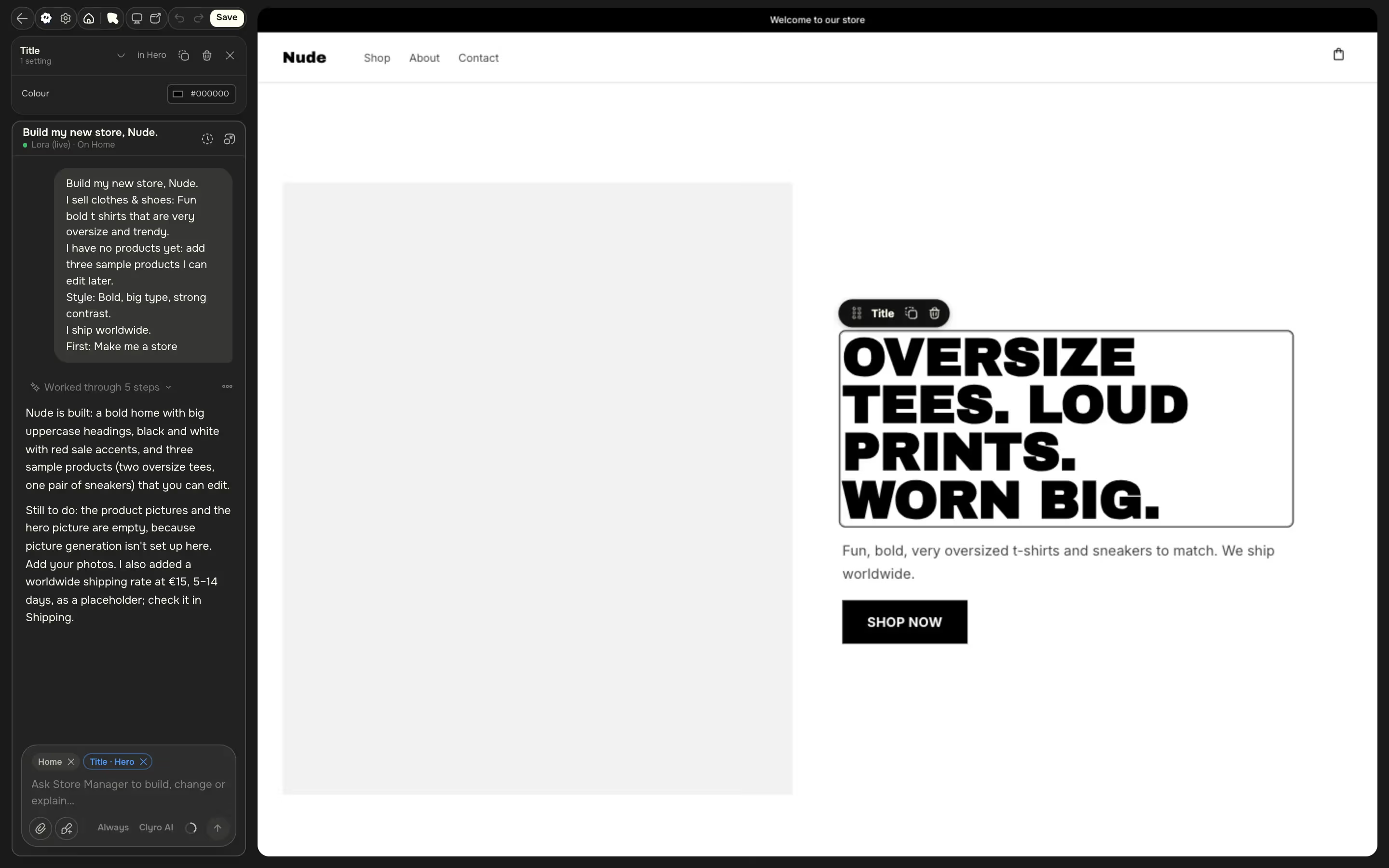
- 1Click anything to select it, then drag, duplicate or delete it
- 2Its settings open here: colour, font, size and more
- 3The Store Manager sees your selection, so “make this bigger” just works
- 4Or just type: any text edits right on the page
4. Your storefront and its draft designs
Store shows your storefront as shoppers see it, which theme is live and who saved it last. Next to it are your draft designs: work on a new look, or try a bigger change, while the live store keeps selling. Your store gets a free Clyro web address, and you can connect your own domain with free SSL.
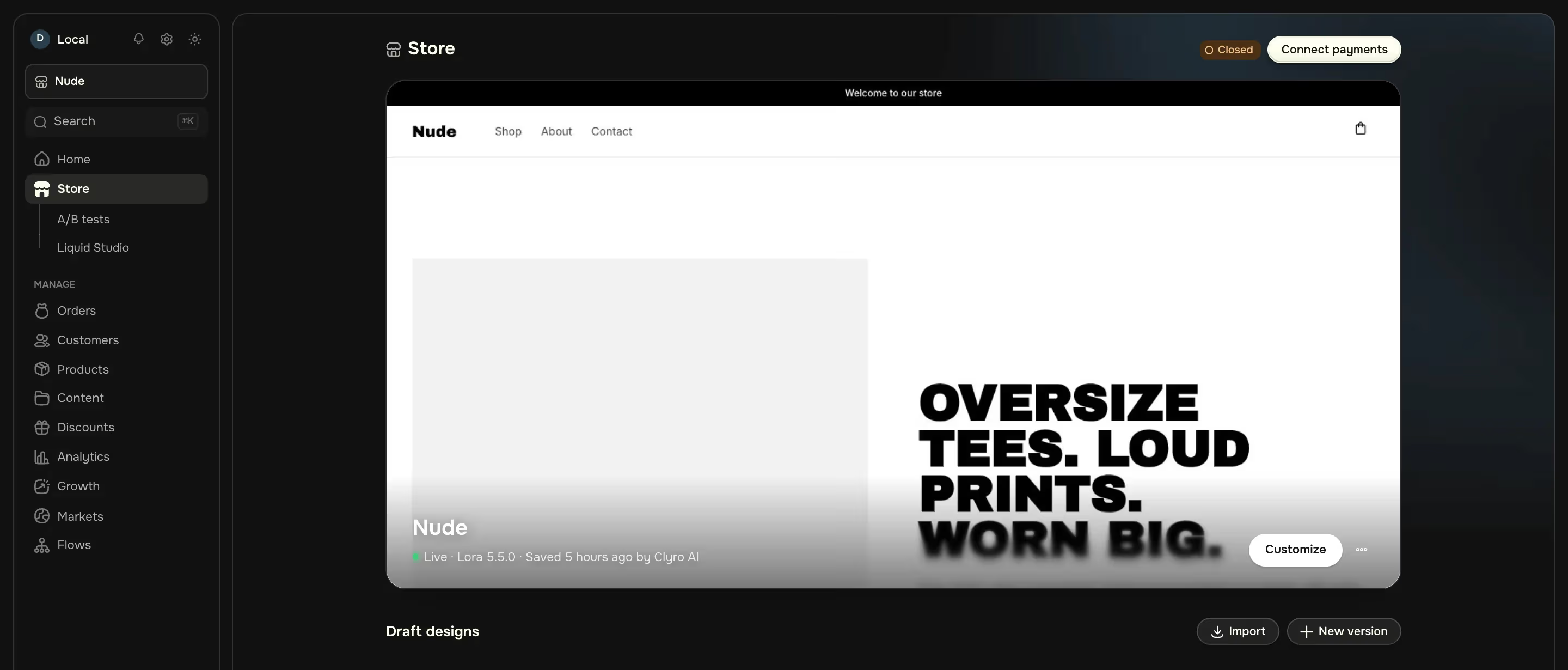
- 1Your storefront, as shoppers see it
- 2The live theme, and who saved it last
- 3Draft designs: a new look while the live store keeps selling
- 4The store opens once payments are connected
5. Products, collections and inventory
Each product has its description, photos, options and variants (up to 100), with price, profit and stock for each. Write descriptions yourself or have the Store Manager write them, and generate or enhance photos with AI. Group products into collections, by hand or automatically, and into categories. Inventory follows stock across locations, with purchase orders, suppliers and transfers, and CSV import and export when you need it.
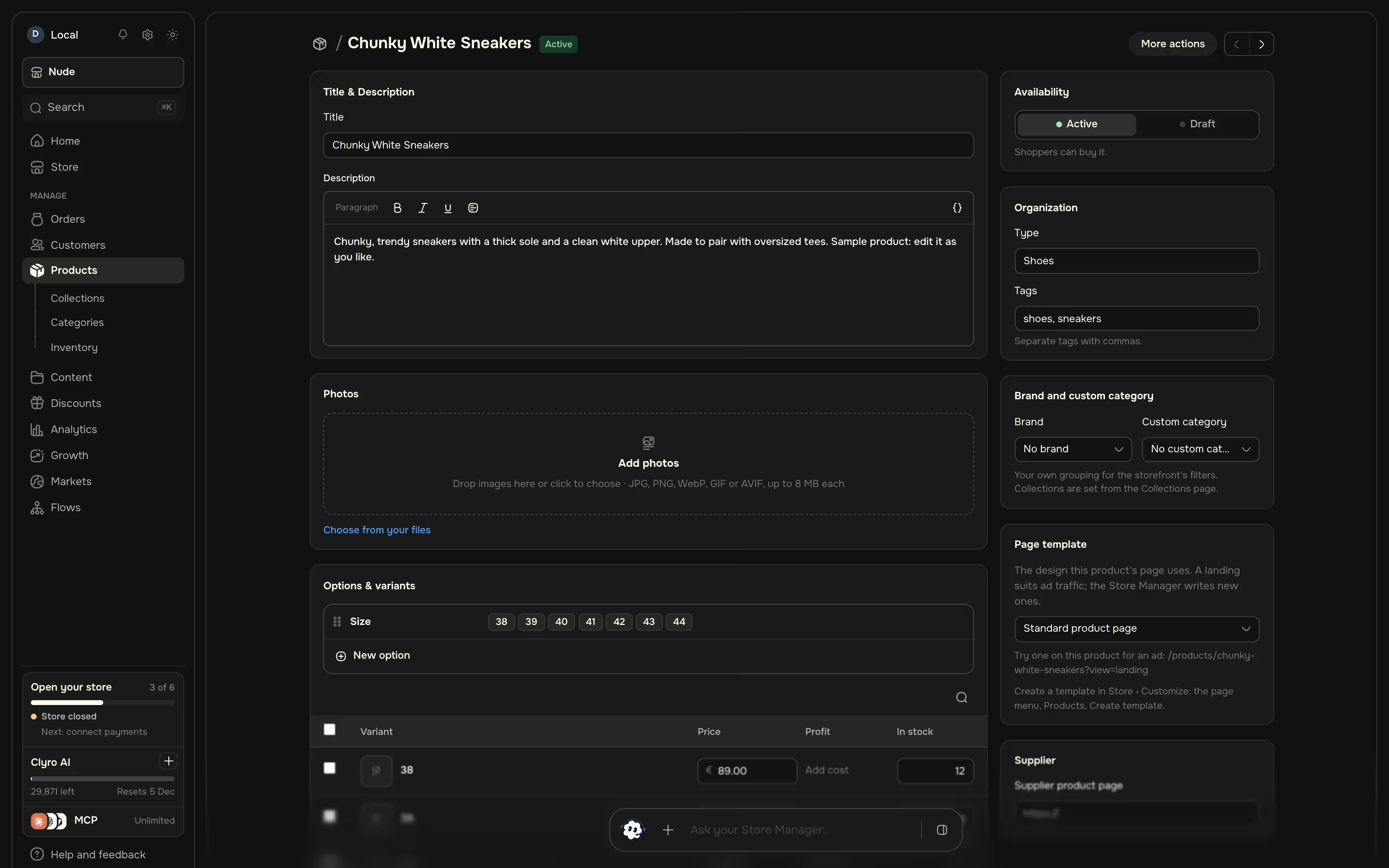
- 1Write it yourself, or let the Store Manager write it
- 2Drop in photos, or have AI generate and enhance them
- 3Sizes, colours and up to 100 variants, each with its price, profit and stock
- 4Publish it, or keep it as a draft
- 5A page design per product, like a landing page for ads
- 6The Store Manager is on every page
6. Checkout and payments, your way
Clyro does not make you use its own payment provider. Connect the one you like, such as Stripe or Whop, and your shoppers pay through a checkout branded as your store:
- Cards, Apple Pay, Google Pay and PayPal
- Bank transfer and cash on delivery
- Subscriptions, draft orders and payment links
- Shipping profiles and rates, and taxes with Stripe Tax
- Abandoned checkout recovery, fraud analysis and chargeback reviews
- Legal pages and a cookie banner, ready to fill in
Clyro charges a small fee on each sale, and it gets smaller as you move up a plan: 0.6% on Starter, 0.3% on Growth and 0.15% on Scale.
7. Sell in more countries
Markets lets you sell to the places you choose, each with its own currency, prices and languages. Clyro translates your store with AI, so adding a country does not mean rewriting your store.
8. Test a new design before everyone sees it
A/B tests put a draft design against your live store. Half your visitors see each, and every visitor keeps seeing the same one. When the test ends, Clyro tells you plainly which one sells better, or that there is no real difference, which is an answer too. It is also the safe way to launch a big change. A/B tests come with Growth and Scale.
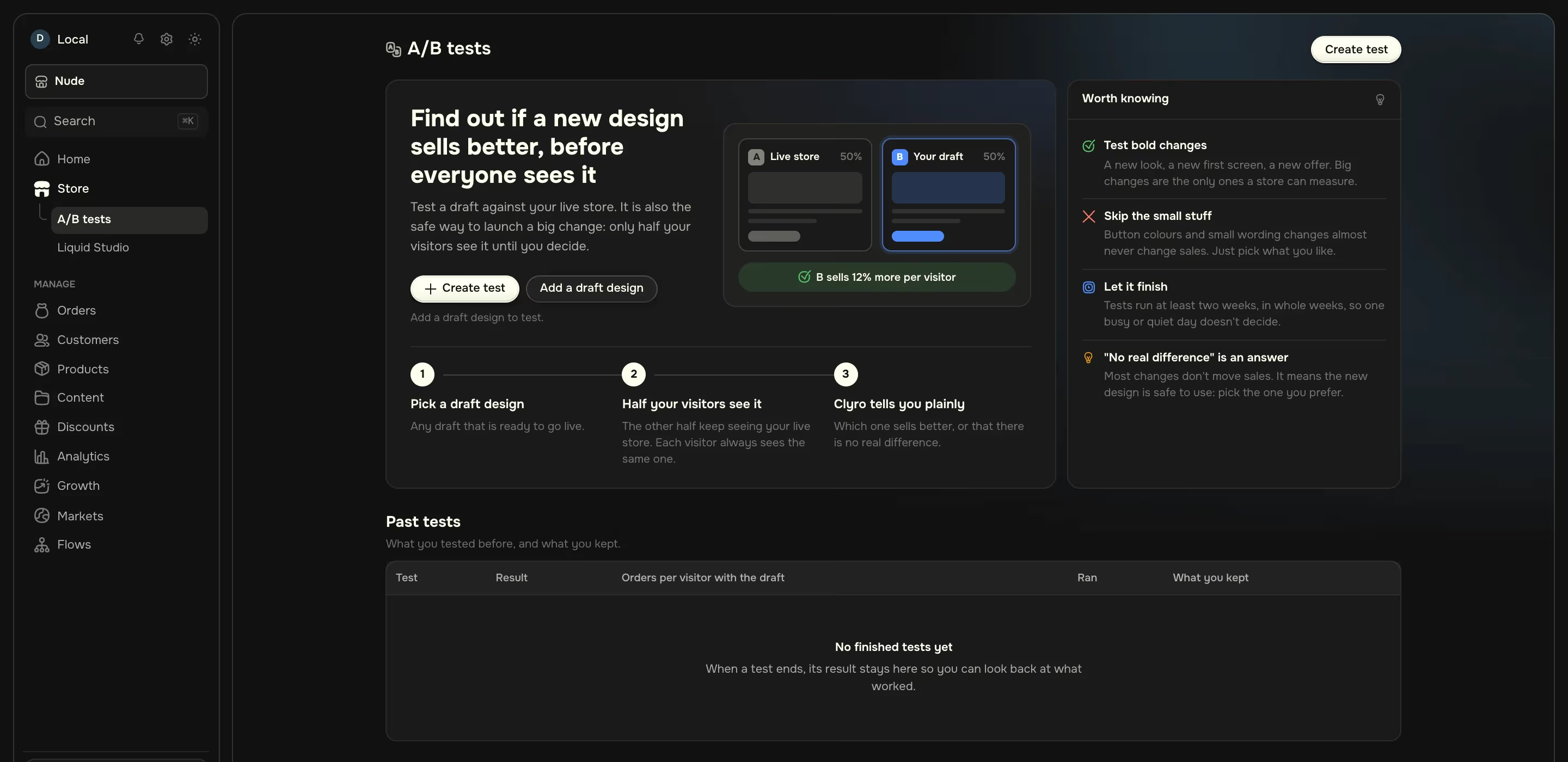
- 1Your live store against a draft, each seen by half your visitors
- 2Pick a draft design and start a test
- 3Clyro tells you plainly which one sells better, or that there is no real difference
- 4Advice on what is worth testing, and what is not
- 5Every finished test is kept, with what you chose
9. Let flows do the repetitive work
A flow starts on its own when something happens, like a shopper leaving the checkout, a product selling out or a risky order coming in, and then takes the steps you set. Start from a ready-made flow, let Clyro suggest some for your store, or build your own. Marketing lives here too: discounts (codes, automatic, Buy X get Y and free shipping), email templates and journeys, ad pixels for Meta, TikTok and Google Analytics, SEO and redirects, and a blog.
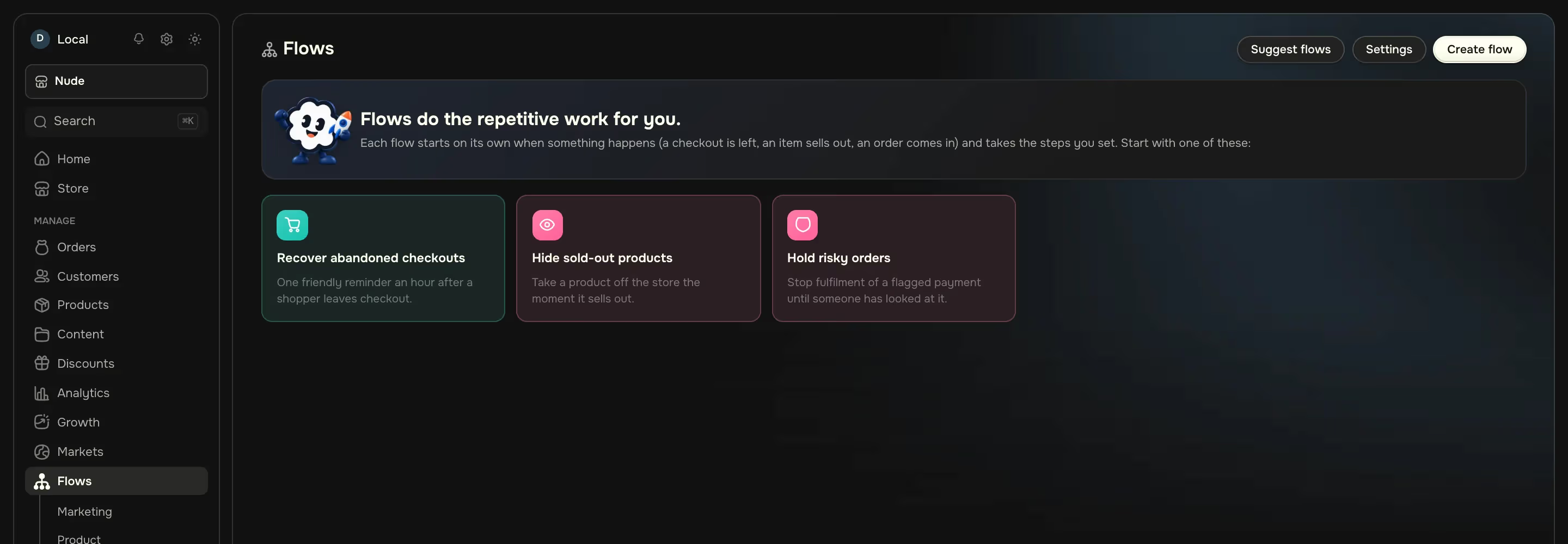
- 1Ready-made flows to switch on
- 2A flow starts on its own, then takes the steps you set
- 3Let Clyro suggest flows, or build your own
10. Know what is happening, as it happens
Analytics gives you a sales overview with AI insights, reports (custom ones too), attribution, and Growth, which shows profit and where your traffic comes from. Live View shows who is on your store this minute: where they are, what they are looking at and what they just did. And Clyro noticed reviews your store with AI and tells you what to fix.
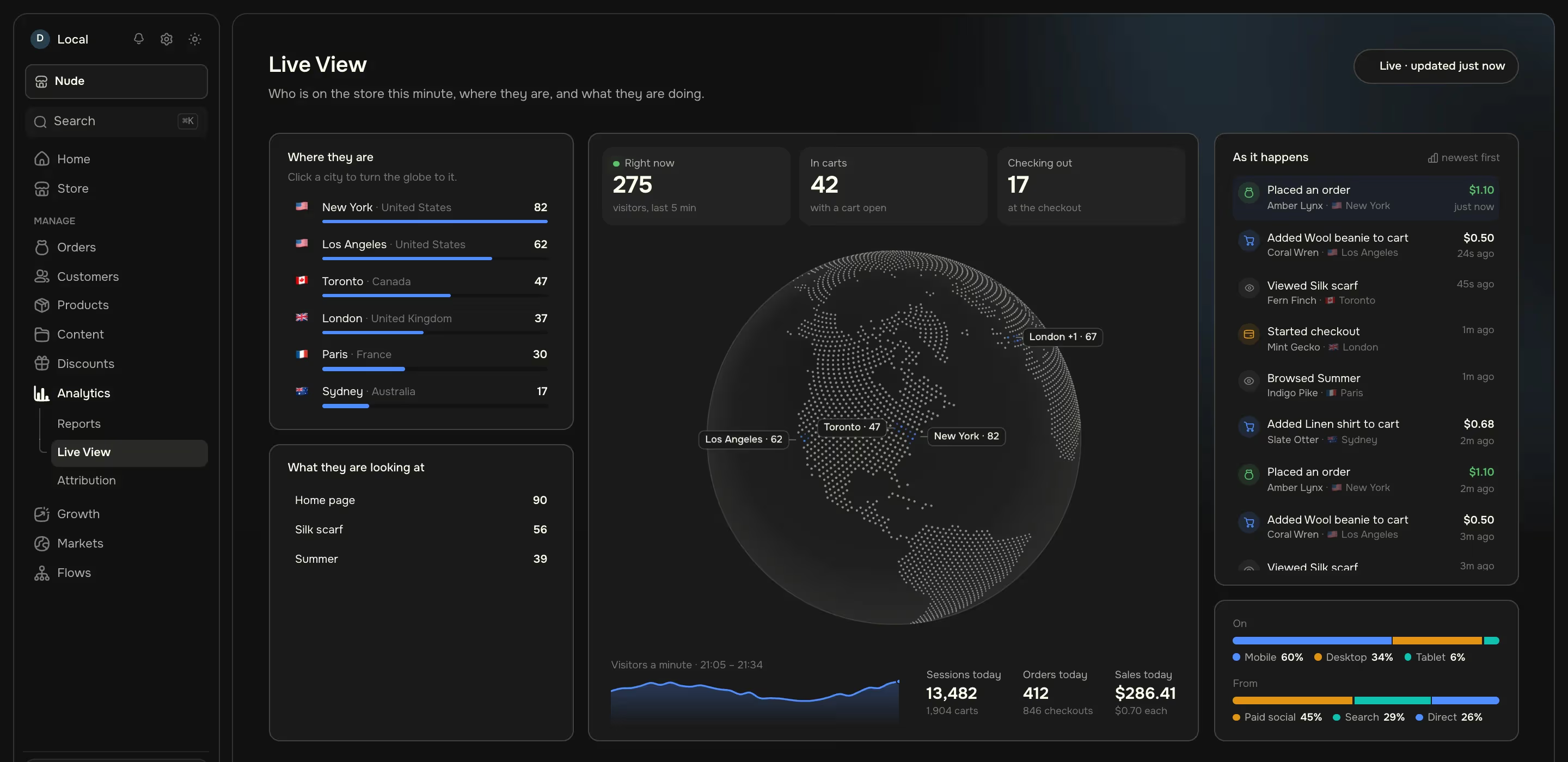
- 1Where your visitors are, city by city
- 2A live globe of who is on the store
- 3Visitors right now, open carts and checkouts
- 4Every order, cart and view as it happens
- 5Which devices and channels they come from
11. Liquid Studio, and your own AI
Liquid Studio builds and edits Liquid themes with the same visual editor, and downloads them as a ZIP. For developers there is the Clyro CLI for themes, and webhooks. And because Clyro has an MCP server, you can connect Claude, ChatGPT or Cursor and work on your store from the assistant you already use. The MCP docs show how.
12. Bring your team
Invite your team with roles and permissions, or start from a permission preset. Starter has 2 seats, Growth 10 and Scale 20, and you can transfer ownership of a store when it changes hands.
Moving from Shopify?
Clyro can import your Shopify catalogue, so your products come with you, and it can take on the style of a website you point it at. Liquid Studio works with Liquid themes, and Klaviyo connects too.
Plans and pricing
Every plan has the Store Manager, the visual builder and everything you need to sell. They differ in stores, seats, AI credits and the fee on each sale.
- Starter, $29 a month ($24 billed yearly): everything to launch and sell. One store, 2 team seats, 2,000 AI credits a month and a 0.6% fee per sale.
- Growth, $79 a month ($66 billed yearly): more stores, more growth. Three stores, 10 seats, 7,500 credits, a 0.3% fee, A/B tests, Fable 5.1 and GPT-6 Astra, and priority support.
- Scale, $249 a month ($208 billed yearly): our lowest fee. Five stores, 20 seats, 25,000 credits and a 0.15% fee.
Every plan starts with a free trial. See the full comparison on the pricing page.
Who uses Clyro?
- First-time sellers who have a product and an idea, and want a store that looks finished without hiring anyone.
- Brands moving from another platform who want their catalogue, their look and a store they can change by asking.
- Teams and agencies running several stores, with seats, roles and up to five stores on Scale.
Start selling with Clyro
The quickest way to understand Clyro is to describe your store and watch it get built. Start a free trial, or read on: the getting started guide, the free tools for store owners, and how Clyro compares with Atlas.
What is Clyro? FAQ
Is Clyro a Shopify app?
No. Clyro is its own store platform: your store is built, hosted and sold through Clyro, with its own checkout, domain and dashboard. If you are moving from Shopify, Clyro can import your Shopify catalogue, and Liquid Studio builds and edits Liquid themes.
Do I need to know how to code?
No. You describe what you want and the Store Manager builds it, and everything else is a click away in the visual builder. Developers still get Liquid Studio, the Clyro CLI for themes and webhooks.
Which AI models does Clyro use?
Every plan has Clyro AI, Claude Haiku, Sonnet and Opus, and GPT-6 Luna, Terra and Sol. Growth and Scale add Fable 5.1 and GPT-6 Astra.
What are AI credits?
AI work in Clyro, like building a page or writing a product description, uses credits. Each plan comes with credits every month: 2,000 on Starter, 7,500 on Growth and 25,000 on Scale, and you can buy more whenever you need them.
Which payment providers can I use?
Any provider you like; Clyro does not make you use its own. Shoppers can pay by card, Apple Pay, Google Pay and PayPal, and you can offer bank transfer and cash on delivery. Clyro charges a small fee on each sale: 0.6% on Starter, 0.3% on Growth and 0.15% on Scale.
Can I edit my store from Claude or ChatGPT?
Yes. Clyro has an MCP server, so you can connect Claude, ChatGPT or Cursor and change your store from the assistant you already use, on every plan.
Is there a free trial?
Yes. Every plan starts with a free trial, so you can build your store and see it working before you pay.